
Open this in UX Builder to add and edit content

On camera flash, get creative

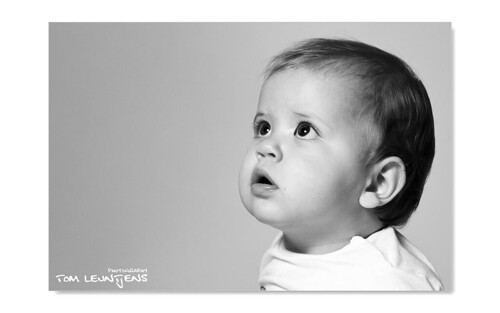
This is actually a reader inspired blogpost. A couple of days ago DieterThePhotographer asked me how I got the clarity/sharpness in Lissa’s eyes and if that reflection in her eyes was a softbox I used…

This shot was actually taken with on camera flash. The camera held in portrait mode (obviously), low enough so it was inside the tub, the flash head in a 75° degree angle with the bounce card out. So the flash was actually aimed to the opposite side of the model, towards the tub. The tub now acted as a gigantic softbox / reflection panel that gave me soft yet very defined 3Dimensional light.

Shot info: 1/200th – F2.8 – ISO400 and for the flash 1/64th was all that was needed.
B/W conversion was done in lightroom. (with increased contrasts/blacks)

Whenever I can I use off camera light, but you can make great pictures if you get creative with what you have available around you.

For the eyes, unfortunately I can’t take any credits. Mom & Dad are still having heavy debates over who’s eyes she has 🙂
“Discovering” pictures in your library

Something weird happened, after showing Emma’s slideshow, a lot of people, including the parents had the above shot as one their favourites.

But this image was actually recovered from my rejected pictures and almost found it’s way to the recycle bin.

When I browse through my pictures I pick/flag the best ones, these are also pictures that don’t need to any photoshop corrections besides the normal exposure and contrast adjustments. This is my A list and these pictures normally make the preview or slideshow presentation. Test shots , blinkers and under/over exposed shots get the rejected (Keyboard command – X) flag.

But there are usually a lot more images to discover in your library when you look at them a second time. What works for me is letting my images rest for a while before taking a new look at them. I exclude my A list and focus on the pictures that are less than good. I also check the rejected pictures before actually deleting them. I turn out the lights (Keyboard command – L) and use the crop board to see what potential an image might have.

This is what the original image looked like … a very uninspiring test shot

Hasse slideshow

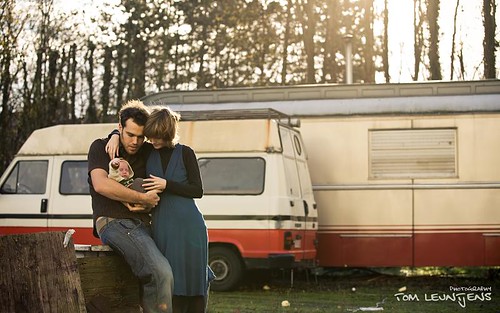
Last weekend I had a super fun shoot with baby Hasse and her proud parents. After the indoor pictures the weather cleared up and I suggested we’d go for a walk, there was a playground nearby. On the way there I spotted an old factory building and and an abandoned gypsy wagon, Kris & Lien were immediately won for the idea of having some “unordinary” baby/family shots 😉

click to start slideshow

When I browse around on flickr I can really enjoy pictures taken against the sun, or pictures that have some flare in them. However I don’t find it easy to always visualize them, let alone make them. I really like how this picture turned out.

Enjoy the slideshow !